Recurring Requests & Templatesfor Jira Service Management
Recurring work, raised on time.
Some requests come back every month. Let the customer schedule them from the portal instead of raising them by hand, forgetting, or emailing an agent to do it. Each one arrives as the customer's own request, with its form answers filled in.
See it in 70 seconds.
A customer repeats a request from the portal, sets a schedule and sees the next dates, can pause or cancel it, saves a template, and the admin sets the limits.
70 seconds, with a spoken voice-over and captions: a portal customer chooses Request again on a request they raised, sets it to repeat every three months at nine in their own time zone and sees the next dates; each repeat is raised as them, into your queue; they can pause, resume or cancel it themselves; a request without a calendar is saved as a template; and the project admin turns scheduling on and sets the limits.
Read the transcript
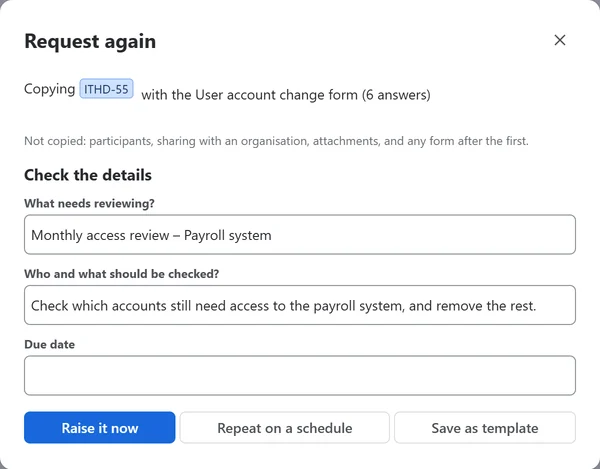
Access reviews, monthly reports, regular maintenance. Some requests come back again and again. A portal customer raises a request, the way they always do. Later, they open it and choose Request again. They set it to repeat: every month, or every three months, at nine in the morning in their own time zone, and see the next dates before saving. Each repeat is raised as the customer, into your queue. And they can pause, resume, or cancel it themselves, without asking an agent. Requests that don't follow a calendar can be saved as templates, and raised again in one click. Scheduling stays off until a project admin turns it on, and sets the limits: how often, for how long, and which request types may repeat. It runs on Atlassian, nothing leaves Atlassian, and it's listed in Isolated Cloud. Recurring Requests and Templates, for Jira Service Management. Find it on the Atlassian Marketplace.
How it works
- Turn it onPer project, with the limits you choose.
- Request againThe customer opens a request they raised before.
- Pick a scheduleDaily, weekly or monthly, in their own time zone.
- It arrives on timeAs the customer's own request, until they pause or stop it.
Set it once. It comes back on its own.
A customer opens a request they already raised and chooses Request again. From there they can raise it immediately, or set it to come back daily, weekly or monthly, on a date and time they pick, in their own time zone.
- Stop after a set number, or let it run to the limit you set
- Pause and resume without losing the schedule
- Cancel at any time from the portal, without asking an agent
- A schedule that fails three times in a row pauses itself and says why
Weighing this against Jira Automation? The guide to recurring tickets after step billing has the arithmetic, a calculator, and when Automation is the better choice.

The requests that come back, but not on a cadence.
A customer can save the details of a request they raise often and raise it again in one click. Nothing is created on its own: a template raises the request, with the saved details, only when the customer clicks Raise it now.

Nothing starts until you say so.
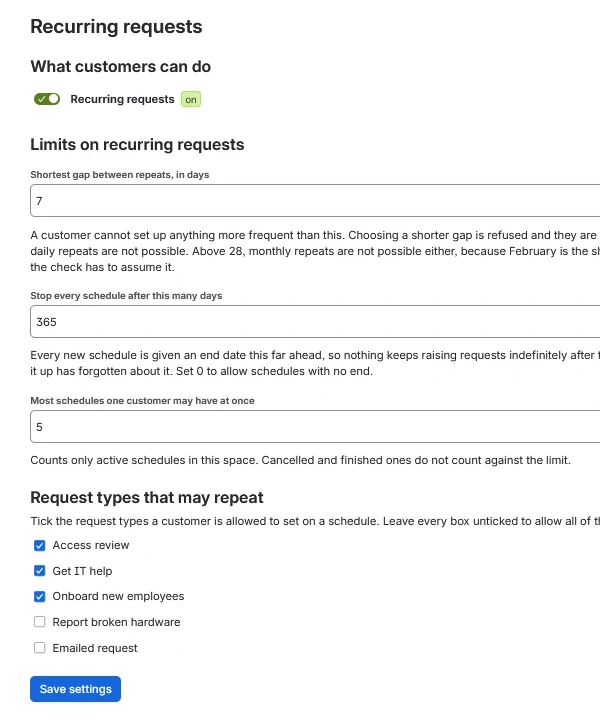
Recurring requests are switched off until you turn them on, per project. Nothing starts appearing in your queue because someone installed an app. When you do turn them on, you decide:
- Which request types may be scheduled, or all of them
- The shortest gap allowed between repeats
- How far ahead a schedule may run before it stops
- How many schedules one customer may have at once
Every schedule in the project is listed with the person who created it, and any of them can be stopped.
Compared with Jira Automation.
How many Automation steps one recurring ticket uses a month. Estimated from Atlassian's counting rules, 21 October 2026.
| Automation steps used a month | Recurring Requests (our app) | Jira's Set to recur | Cheapest Automation flow in our guide |
|---|---|---|---|
| Every day | 0 | 60.9 | 60.9 |
| Every weekday | 0 | 43.5 | 43.5 |
| Weekly on one day | 0 | 8.7 | 8.7 |
| Monthly on a date | 0 | Not offered | 2 |
| Quarterly on a date | 0 | Not offered | 0.7 |
| What you pay with | The app's price; free for up to ten users | Steps from your site's shared Automation allowance | Steps from your site's shared Automation allowance |
Automation is the better choice for admin- or agent-owned work, for work after the ticket exists (assigning, transitioning, notifying), and for Jira work outside Jira Service Management. When Automation, or another app, is better
Details worth knowing.
How a repeat behaves in your queue, and what it does not copy.
- Raised as the customer, not as the app
- A scheduled request appears in your queues attributed to the person who asked for it, follows the request type's workflow, and counts toward your SLAs exactly like one they typed.
- The attached form carries across
- With its answers, including tables, choice questions and contact details. If a request has several forms, only the first form’s answers are copied.
- Times are local, and stay local
- A schedule stores a wall-clock time and a time zone, so nine in the morning stays nine after the clocks change. The 31st falls back to the 28th in February and returns in March.
- Files are not copied
- An attachment belongs to the request it was added to, and a scheduled repeat has nobody present to choose a file. Customers are told so in the app, and can attach what they need once the request is raised.
- Fields that point at another record
- Such as Affected services, are left blank and named, so they can be chosen again. If the request type requires one, a schedule cannot raise it unattended and pauses after three failed runs, saying why.
- Participants and organization sharing
- Are not copied. The new request is raised by the customer alone.
Security and data.
The app stores an Atlassian account ID against each schedule and template, because a scheduled request has to be raised as the person who asked for it, and it keeps the answers of any attached form so they can be reproduced. It reports those accounts to Atlassian weekly and erases everything held for an account once Atlassian reports it closed. Canceling a schedule or deleting a template removes its stored details; after an uninstall, Atlassian keeps the app's storage for 28 days and then deletes it.
This app in the trust centerSecurity review pack
Published: security policy privacy policy DPA SLA security questionnaire, answered
- Permissions
- Requests, Jira work, storage, a weekly reportRead and create service desk requests, read Jira work, app storage, and a weekly personal-data report. Nothing else.
- Attribution
- Always the customerRequests are created as the customer who scheduled them, never as another user.
- Storage
- Forge storage, inside AtlassianSchedules, templates, saved request details and settings.
- Regulated clouds
- Listed for Isolated CloudSince 12 November 2026: the same app, with the same features, as in the normal cloud. Where each app is listed
- Servers and egress
- NoneRuns on Atlassian. Nothing is sent outside Atlassian's infrastructure.
Pricing.
Free for up to ten users. Above that, one price a year for the whole site, set by its user tier. List prices on the Atlassian Marketplace, in US dollars, as read on 18 November 2026.
- Up to 10 usersFreeno time limit
- 25 users$105a year
- 50 users$210a year
- 100 users$420a year
- 200 users$810a year
- 500 users$1,880a year
- 1,000 users$3,630a year
- 2,000 users$6,630a year
- Every tier
- From 15 up to 100,000 users, and monthly billing per user, on the Marketplace listing and its price calculator.
- Billed by Atlassian
- You buy, renew or cancel the app through your Atlassian site's billing, with your other subscriptions.
- Isolated Cloud
- Has its own price list, shown on the app's Isolated Cloud listing.
Try it on your own service project.
Recurring Requests & Templates is on the Atlassian Marketplace for Jira Service Management Cloud, with a free trial. A site with up to ten users pays nothing for it. Prices are above and on the listing.
- Automation, or this app?
- The guide to recurring tickets after step billing works out what Automation costs your site, with a calculator, and says when it is the better choice.
- Like the app?
- Rate it on the Marketplace. A rating, good or bad, helps other service teams decide.
- Support
- Read the documentation or the common questions, then email support@eriksenlabs.com. First reply in one to three business days, depending on severity (see the SLA).
Questions people ask.
How do customers repeat a request in Jira Service Management?
A customer opens a request they already raised in the portal and chooses Request again. They can raise it now, set it to repeat daily, weekly or monthly, or save it as a template. The guide How can customers repeat a request compares the ways to do it.
Does a scheduled request use Jira Automation steps?
No. The app does not use Jira Automation at all, so its repeats use no Automation steps. The guide to recurring tickets after step billing works out what the same jobs cost with Automation.
How much does Recurring Requests cost?
A site with up to ten users pays nothing for it. Prices for larger sites, and a free trial, are on its Marketplace listing.
Can admins control what customers schedule?
Yes. Recurring requests are off until you turn them on, per project. You choose which request types may repeat, the shortest gap, how far ahead a schedule may run and how many schedules one customer may have, and you can stop any schedule. The documentation shows the settings.
Who does a scheduled request appear to come from?
From the customer who scheduled it. It follows the request type's workflow and counts toward your SLAs exactly like one they typed. The app never creates a request as another user. The documentation has the details.
What data does Recurring Requests store?
An Atlassian account ID against each schedule and template, and the answers of any attached form, in Forge storage inside Atlassian. It reports those accounts to Atlassian weekly and erases what it holds once an account is closed. The privacy policy has the details.
Is it available in Atlassian Isolated Cloud?
Yes. It has been listed in Isolated Cloud since 12 November 2026, with the same features as in the normal cloud. Scheduling is off until a project admin turns it on. Regulated clouds says where each app is listed.
Does it work on Jira Service Management Data Center?
No. It is built on Atlassian Forge for Jira Service Management Cloud, not Data Center or Server. Moving from Data Center says how your recurring requests come across to Cloud.
What happens to our data if we uninstall?
Requests it already raised are ordinary requests in your project and stay. Atlassian keeps the app's storage, with schedules and templates, for 28 days after uninstall, then deletes it.
Who is behind this app?
Eriksen Labs, an independent software company in Norway (Eriksen ENK, org. no. 937 027 834). We build Recurring Requests and support it ourselves, with a first reply in one to three business days (see the SLA). It runs on Atlassian's platform; we operate no servers.
Guides
All guides- Recurring tickets after Automation step billingWhat a recurring ticket costs in steps, cheaper recipes, and a calculator.
- Scheduled Automation rules or Recurring RequestsWho owns the schedule, what each costs in effort, and when Automation is the better choice.
- Recurring access reviewsA quarterly review that comes back without a reminder.
- Recurring patching windowsA monthly pattern such as the second Tuesday, with closed days.
- Recurring backup restore testsA quarterly restore test, and a note if a schedule stops.
- Let customers repeat a request from the portalWhy customers cannot do it on their own today, and the options.
- Request templates in Jira Service ManagementField help, preset values, forms and portal groups, with four to copy.
- Regulated clouds: where each app is listedAll three apps are listed in Isolated Cloud.