Issue Templates & Create Defaultsfor Jira Cloud
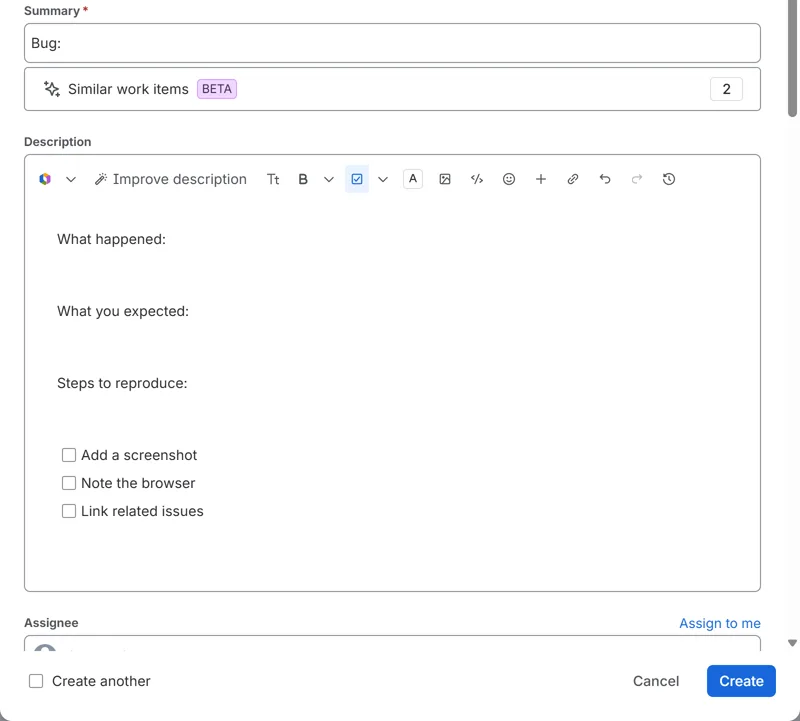
Jira's own Create dialog, already filled in.
When every bug report should answer the same questions, give it a template. Pick it on the project's Templates page, and Jira's own Create dialog opens with the summary, description, checklist, labels and priority in place.

See it in 78 seconds.
One template creating an epic and its eight work items, the Create dialog opening filled in, and a Jira Automation rule doing it for every new epic.
78 seconds, with a spoken voice-over: one template creating an epic and its eight work items in order, Jira's own Create dialog opening filled in, a work item saved as a template, a template's work items added to an existing epic after a preview, and a Jira Automation rule that does it for every new epic.
How it works
- Write a templateIn the template editor, or save a good issue as one.
- Pick itOn the project's Templates page, beside its sidebar.
- Create opens filled inJira's own dialog, with children created after it.
- It keeps workingThe daily check says when a project change breaks it.
Templates people choose.
Each project gets a Templates page in its sidebar, and one page under Apps lists them for every project you can see. Pick a template, choose the issue type if more than one fits, and press Create. Jira's own Create dialog opens with what the template sets:
- The summary, which can be a prefix such as
Bug:that people type after - The description, formatted or plain, whichever the project's field uses
- A checklist at the end, as Jira's own tickable action items
- Labels and priority
A template can also set the assignee (the person using it), a due date some days ahead, components and custom fields such as dropdowns, text, numbers and dates. People can change everything before creating. Jira's required fields, permissions and workflow apply as usual, and the app never creates the issue itself.
The epic, its stories and every sub-task.
A template can list the work items that go under the one it makes: the stories and tasks of an epic, with sub-tasks under each, or the sub-tasks of a task or bug. Once Jira's Create dialog has created the work item, the app creates them under it, one at a time, in the template's order.
{{parent.key}},{{parent.summary}}and{{today}}in summaries and descriptions, so a sub-task can read Reproduce CP-14- Add work items from template adds them under a work item that already exists, after showing what will be created
- Every work type checked against the project first; if Jira still refuses one, resume without duplicates or skip it
They are created with the permissions of the person using the template: up to 30 child work items per template and 20 sub-tasks under each.
The details in the documentation · How this compares with what Jira does on its own

Know a template still works.
Projects change after a template is set up: an issue type is renamed, a field leaves the create screen, a project is archived. Check now tests each template in its projects and marks it works, check or broken, with the reason in words. The same check runs by itself once a day, and lists anything new under Recent findings until someone dismisses it.
- The project, its issue types and the fields the template fills
- Whether the Create dialog carries the template as last saved
- One Jira issue when a check finds something new, if an administrator turns it on
It only reads. Nothing is changed.

Every change can be undone.
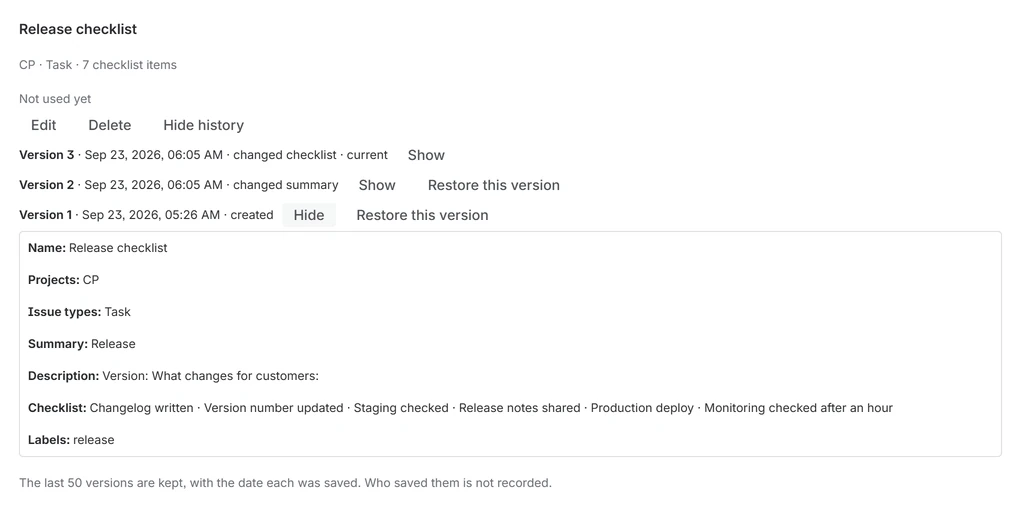
Every save keeps a version of the template, with the date, the time and which parts changed. The last 50 versions are kept. Restore an older one and it is saved again as the newest, so going back loses nothing. A deleted template can be restored for 30 days, with its history and usage counts. Who saved a version is not recorded.
Compared with eleven other apps.
From our comparison of twelve Jira issue template apps, ours included, with prices and listings as checked on 21 October 2026.
| As of 21 October 2026 | Issue Templates & Create Defaults (ours) | The other eleven apps |
|---|---|---|
| Price a year at 50 users | $200 | $215 to $540 for the ten paid apps (median $302.50); one is free |
| Runs on Atlassian badge | Yes | Yes for 8; not stated for 2; no for 1 |
| Data sent outside Atlassian | None | None stated for 9; usage analytics for 1, template definitions on an outside host for 1 |
| Sub-tasks | Yes | Yes for 8; for 2 only by filling in Jira's own sub-task dialog; not stated for 1 |
| Hierarchy under an epic | The epic, its children, and the sub-tasks under each | Yes for 8, to different depths; no for 2; not stated for 1 |
| Version history with restore | The last 50 versions, with restore; deleted templates kept 30 days | Not stated for 8; drafts for 1; earlier values without restore for 1; no for 1 |
| Trust programs | None; Runs on Atlassian only | Cloud Fortified for 8, SOC 2 for 3, ISO 27001 for 1 |
Details worth knowing.
Where the app stops, so nobody finds out after buying it.
- Which fields it fills
- Summary, description (with the checklist), labels and priority, and the optional fields above. The app creates no custom fields and changes no screens.
- Jira's Create dialog only
- A template fills in only when picked on the Templates page. Quick create on a board or backlog, email, Automation and the REST API do not use that page (from an Automation rule, the app’s own action adds a template’s work items), and Jira's mobile apps and cloning are not on Atlassian's list of places the default line runs. Sub-task types are never offered as the top work item.
- Projects it supports
- Atlassian lists company-managed and team-managed software and business projects. Service projects are not on that list.
- A default per work type
- When someone opens Create and chooses a type with a default, the app adds one line under Summary that names the template. It fills in nothing itself, so it cannot overwrite what someone has typed. One default per work type in each project.
- Save an issue as the template
- Project and Jira administrators can choose Save as template from an issue's ••• menu. Formatting and checklists are kept; @mentions, attachments, links to people's profiles and email addresses are left out, and the app says how many. The issue itself is not changed.
- Who can change what
- Jira administrators manage every template, the daily check and its alerts. Project administrators manage their own project's templates; a template shared by several projects is changed only by a Jira administrator. Each is checked against Jira's own permissions, on Atlassian's platform.
Limits, issue type matching and the checklist, in the documentation
Security and data.
Templates hold what administrators write or copy from an issue. The app records nothing about the people who use it: not who saved a template, and not who used one. What someone types in the Create dialog is read in their browser, only to decide whether to name the default, and is never stored.
This app in the trust centerSecurity review pack
Published: security policy privacy policy DPA SLA security questionnaire, answered
- Permissions
- Six scopesFive are Atlassian's scope group for apps that work in the Create dialog, which must be declared together; the sixth is app storage. Each is explained on the security page.
- Storage
- Forge storage, inside AtlassianTemplates, versions, counts and check findings. Default templates are also copied into Jira's own Create dialog settings, because that is how Jira hands them to the dialog.
- Regulated clouds
- Listed for Isolated Cloud and Government CloudIsolated Cloud since 12 November 2026: the same app, with the same features, as in the normal cloud. Government Cloud since 20 November 2026; there, Jira Automation does not offer the app's two actions. Where each app is listed
- Servers and egress
- NoneRuns on Atlassian. Nothing is sent outside Atlassian's infrastructure.
Pricing.
Free for up to ten users. Above that, one price a year for the whole site, set by its user tier. List prices on the Atlassian Marketplace, in US dollars, as read on 18 November 2026.
- Up to 10 usersFreeno time limit
- 25 users$100a year
- 50 users$200a year
- 100 users$400a year
- 200 users$700a year
- 500 users$1,350a year
- 1,000 users$2,350a year
- 2,000 users$3,550a year
- Every tier
- From 15 up to 100,000 users, and monthly billing per user, on the Marketplace listing and its price calculator.
- Billed by Atlassian
- You buy, renew or cancel the app through your Atlassian site's billing, with your other subscriptions.
- Isolated Cloud and Government Cloud
- Each has its own price list, shown on the app's listing for that cloud.
Try it on your own Jira site.
Issue Templates & Create Defaults is on the Atlassian Marketplace for Jira Cloud, with a free trial. A site with up to ten users pays nothing for it. Prices are above and on the listing.
- Comparing apps?
- Twelve Jira issue template apps compared, ours included: price, where data goes, and what each creates.
- Like the app?
- Rate it on the Marketplace. A rating, good or bad, helps other teams decide.
- Support
- Read the documentation or the common questions, then email support@eriksenlabs.com or use the support portal. First reply in one to three business days, depending on severity (see the SLA).
Questions people ask.
Can a template create an epic with its stories and sub-tasks?
Yes. A template can list the stories and tasks under an epic, with sub-tasks under each, and the app creates them in the template's order once Jira's Create dialog has created the epic. Up to 30 child work items per template and 20 sub-tasks under each. The guide to templates with sub-tasks compares this with Jira on its own.
How do I know a template still works after a project changes?
Check now on the admin page tests each template in its projects and marks it works, check or broken, with the reason in words. The same check runs once a day and lists anything new under Recent findings. The documentation lists what it looks at.
How much does Issue Templates cost?
A site with up to ten users pays nothing for it. Prices for larger sites, and a free trial, are on its Marketplace listing.
Where is template data stored, and what does the app record about people?
In Forge storage, inside Atlassian. The app has no servers of its own and sends nothing outside Atlassian's infrastructure. It records nothing about who saves or uses a template: use is counted, never attributed. The trust center lists its six scopes and the privacy policy everything it keeps.
How does a template get into Jira's Create dialog?
Pick it on the project's Templates page, and Create opens with the summary, description, checklist, labels and priority filled in. If someone opens Create directly, the app adds one line that names the default template and fills in nothing. The documentation shows both.
Does it work in Jira Service Management service projects?
Atlassian lists company-managed and team-managed software and business projects as supported. Service projects are not on that list. For requests that customers raise again and again, see Recurring Requests.
Does it work on Jira Data Center?
No. It is built on Atlassian Forge for Jira Cloud, not Data Center or Server. Moving from Data Center says how your templates come across to Cloud.
Is it available in Atlassian Isolated Cloud or Government Cloud?
Yes. It has been listed in Isolated Cloud since 12 November 2026, with the same features as in the normal cloud, and it sends nothing outside Atlassian there either. It is also listed in Atlassian Government Cloud since 20 November 2026, where Jira Automation does not offer the app's two actions (checked on our Government Cloud test site on 21 November 2026). Regulated clouds says where each app is listed.
What happens to our data if we uninstall?
Issues it created are ordinary Jira issues and stay. Atlassian keeps the app's storage, with your templates, for 28 days after uninstall, then deletes it. Default templates are also copied into Jira's Create dialog settings; the documentation says how to clear them before uninstalling.
Who is behind this app?
Eriksen Labs, an independent software company in Norway (Eriksen ENK, org. no. 937 027 834). We build Issue Templates and support it ourselves, with a first reply in one to three business days (see the SLA). It runs on Atlassian's platform; we operate no servers.
Guides
All guides- Jira issue templates: what Jira does on its ownDefault descriptions, Automation, cloning and request types, and where each stops.
- Templates with sub-tasksMaking a work item start with the same sub-tasks every time.
- An epic template with stories and sub-tasksAn Automation rule, what each run costs in steps, and lists to copy.
- Clone a work item, or use a template?What the Clone dialog copies and leaves behind, with a decision table.